No two businesses schedule work the same way. A system that ignores that just creates friction.
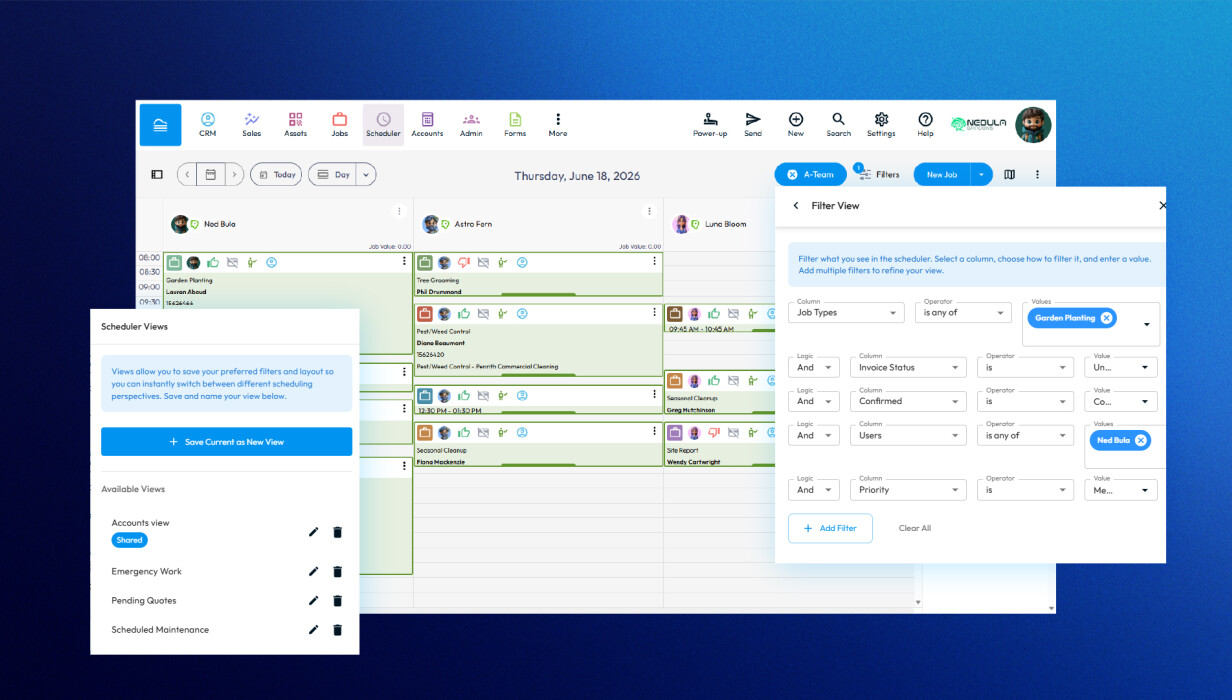
The latest Formitize Scheduler updates let you personalise your view, save the layouts you use most, and create jobs without the usual back-and-forth. Less time navigating, more time dispatching.
Make the Scheduler Work for You
The Scheduler has always been the heart of job management within Formitize. Recent improvements make it even easier to tailor the experience to suit different users, teams and business processes.
Rather than every user seeing the same layout, each person can customise the Scheduler to display the information that's most important to them.
This means less time searching for information and more time managing jobs.
Save Time with Views and Filters
If you regularly search for the same information, you no longer need to recreate those filters every time.
Using Views, you can save combinations of filters for quick access.
For example, you might create views for:
-
Today's Jobs
-
My Jobs
-
Emergency Work
-
Scheduled Maintenance
-
Pending Quotes
-
Jobs Waiting for Parts
-
Specific technicians or teams
-
Individual branches or locations
Views can be shared with user groups or kept private, allowing each department to work with the information that's most relevant to them.
Whether you're managing a small team or coordinating hundreds of jobs, saved Views make navigating the Scheduler significantly faster.
Personalise Your Scheduler
Every scheduler looks a little different depending on how you work.
The Formitize Scheduler allows you to customise:
-
Business hours and working days
-
Day, Week and Month layouts
-
Job card information
-
Hover summary details
-
Quick action icons
-
Background colours
-
Screen layout preferences
You can even choose different layouts for different Scheduler views, giving you complete flexibility over how information is displayed.
These personalisation options help reduce clutter while making important information easier to find.
Create Jobs Faster
There are multiple ways to create new jobs directly from the Scheduler.
Depending on your preferred workflow, you can:
-
Drag and drop directly into the Scheduler.
-
Use the New Job button.
-
Create jobs from Job Type Templates.
-
Use Quick Create while reviewing available appointment times.
Combined with Job Type Templates, much of the job information can already be pre-filled, helping reduce repetitive data entry and ensuring consistency across your team.
Built for Every Type of Business
The Scheduler is used across hundreds of industries, including:
-
Pest Management
-
Building & Property Inspections
-
Fire Protection
-
HVAC
-
Cleaning Services
-
Asset Management
-
Electrical
-
Plumbing
-
Landscaping
-
Healthcare
-
Government
-
Facilities Management
Because every business works differently, the Scheduler has been designed to provide flexibility rather than forcing a single scheduling approach.
Why Personalisation Matters
A Scheduler should help your team work faster, not create additional administration.
By allowing users to customise layouts, save commonly used Views and create jobs more efficiently, businesses can:
-
Reduce scheduling time.
-
Improve visibility across teams.
-
Find information faster.
-
Minimise unnecessary clicks.
-
Increase productivity for office staff and dispatchers.
-
Deliver a better experience for field technicians.
Small changes to the way information is displayed can have a significant impact on day-to-day efficiency.
Frequently Asked Questions
Can I save my own Scheduler views?
Yes. Views can be saved for your own use or shared with user groups, making it easy for different teams to access the information they need.
Can I customise what appears on job cards?
Yes. You can choose which information appears on job cards and in rollover summaries, allowing you to prioritise the fields most important to your business.
Can different users have different Scheduler layouts?
Yes. Users can personalise many aspects of the Scheduler, and Views can be shared with specific user groups where appropriate.
How many ways can I create a job?
Jobs can be created in several ways, including drag and drop, the New Job button, Job Type Templates and Quick Create, giving users the flexibility to choose the workflow that suits them best.
Can I hide information I don't use?
Yes. Many Scheduler elements can be shown or hidden, helping reduce clutter and create a cleaner workspace.
Work the Way That Suits Your Business
Every business schedules work differently, and your software should support that.
The Formitize Scheduler gives you the flexibility to personalise your workspace, save time with reusable Views, and create jobs using the workflow that makes the most sense for your team.
Whether you're managing five jobs a day or five hundred, a Scheduler tailored to your business helps everyone work more efficiently.
 Back to Smart Business Hub