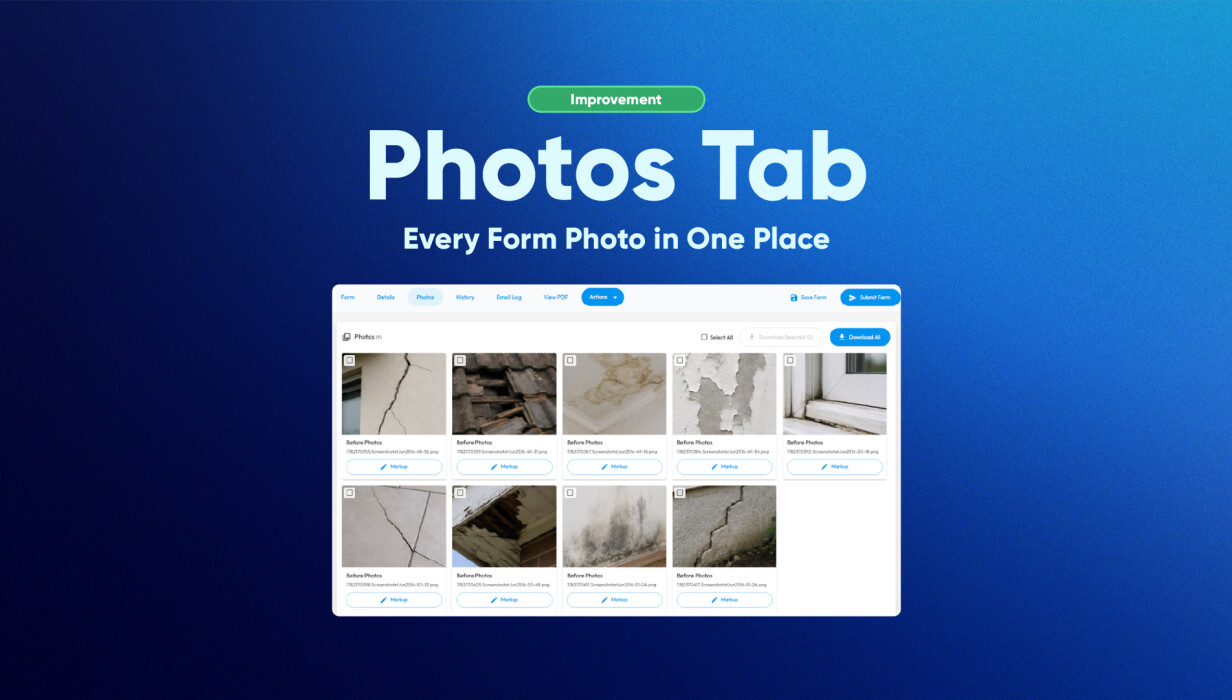
Scrolling through a long form to find one photo gets old quickly, particularly when you're doing it across multiple jobs. The Photos Tab collects every image from a form into a single gallery, automatically, so the hunting stops.
Review, download, share. It's all in one place.
What’s New: Photos Tab
The Photos Tab automatically gathers all photos captured throughout a form and displays them in a single gallery view.
Users can now:
-
View all photos from a form in one location.
-
Review images without navigating multiple sections.
-
Download individual images.
-
Download all captured photos at once.
-
Quickly confirm required photos have been captured.
-
Access images while reviewing saved or submitted forms.
This creates a more efficient approach to inspection photo management and improves visibility across completed jobs.
How Form Photo Management Solves a Common Problem
Many inspections, audits, and service forms contain photos spread throughout multiple pages or sections. Locating a specific image can require scrolling through long forms and remembering where each photo was originally captured.
This creates delays for:
-
Office teams preparing reports.
-
Supervisors reviewing completed work.
-
Quality assurance staff performing checks.
-
Technicians confirming site evidence.
The Photos Tab removes this friction by automatically consolidating images into one gallery while keeping photos linked to their original questions and reporting logic.
Users spend less time searching and more time reviewing important information.
How Customers Use This in Practice
The Photos Tab supports a wide range of real-world workflows.
Pest Control Technicians
Quickly review treatment photos before finalising service reports.
Building and Pest Inspectors
Access all inspection evidence without scrolling through lengthy reports.
Safety Auditors
Review compliance photos from multiple sections in a single gallery.
Property Managers
View site condition images without navigating the entire form.
Office Administrators
Prepare reports faster by accessing all captured images from one location.
Quality Assurance Teams
Conduct visual reviews and verify documentation more efficiently.
This improved photo gallery for inspections helps teams work faster while maintaining confidence in their records.
Why This Matters for Growing Teams
As businesses complete more inspections, audits, and field services, forms naturally become larger and contain more visual evidence.
The Photos Tab helps growing teams by:
-
Reducing time spent reviewing forms.
-
Improving consistency during quality checks.
-
Making evidence easier to access.
-
Supporting faster report preparation.
-
Simplifying field service reporting workflows.
-
Improving visibility across completed jobs.
For businesses managing large volumes of inspections or assessments, better digital inspection software tools help reduce administrative effort while improving operational efficiency.
Frequently Asked Questions
What is the Photos Tab?
The Photos Tab is a gallery view that automatically displays all photos captured within a form.
Can I view photos from different sections together?
Yes. All photos captured throughout the form appear together in one gallery.
Can I download the photos?
Yes. Users can download individual images or download all photos at once.
Does the Photos Tab change my PDF reports?
No. The Photos Tab is a viewing and management tool and does not alter your existing report layout.
When does the Photos Tab become available?
The Photos Tab becomes available once photos have been captured and the form has been saved or submitted.
Where can I access the Photos Tab?
The Photos Tab is available when viewing saved or submitted forms through the Formitize Web Portal.
Conclusion
The Photos Tab simplifies form photo management by bringing every captured image together in one easy-to-use gallery.
By reducing the time spent searching through forms, improving visibility, and making photo reviews faster, the Photos Tab helps teams work more efficiently and maintain confidence in their reporting processes.
For organisations that rely on inspections, audits, and field reporting, having every photo available in one place makes day-to-day work simpler and easier to manage.
 Back to Smart Business Hub